 POIshelf
If you use a Garmin car sat-nav and a Mac, there is a good chance you have used Garmin POI Loader at some point. It is the small Garmin app that takes a file of points of interest, such as speed cameras, campsites or your own favourite places, and puts it on your device. For years it has quietly done its job.
The trouble is that POI Loader for Mac was built for Intel Macs. On a Mac with an Apple Silicon chip (M1, M2, M3, M4 and later), it only runs because macOS translates it in the background with a tool called Rosetta 2. Apple has said that Rosetta 2 is going away as a general feature, and macOS 28 is the release where that change is expected to land. When it does, POI Loader will stop opening on those Macs.
This guide explains what that means in plain terms, how to check whether you are affected, and what your options are.
What Rosetta 2 does, in one paragraph
Apps are built for a particular kind of processor. Older Macs used Intel processors; newer Macs use Apple's own chips. When Apple switched, it added Rosetta 2 so that apps built only for Intel could keep running. You usually never see it: the first time you open an Intel app, macOS may ask to install Rosetta, and after that the app just works, a little slower. Rosetta 2 was always meant as a bridge while developers updated their apps. Apple has announced that the bridge is being taken down, keeping only limited support for some older games.
Am I affected?
You are affected if all of these are true:
- Your Mac has an Apple Silicon chip. Open the Apple menu, choose About This Mac, and look for "Chip: Apple M…". If it says "Processor: Intel", your Mac is an Intel Mac and this change does not apply to you. Intel Macs are not expected to get macOS 28 at all.
- You load custom POIs with Garmin POI Loader.
- You plan to update to macOS 28 or later, or you buy a new Mac that comes with it.
You can also check POI Loader itself. Select it in the Applications folder, choose File › Get Info, and look at Kind. "Application (Intel)" means it needs Rosetta 2 on an Apple Silicon Mac.
What stops working, and what does not
Once Rosetta 2 is gone, POI Loader simply will not open on an Apple Silicon Mac. Nothing on your Garmin changes on that day. The POIs you already loaded stay on the device and keep working, because the device does not care which app wrote the file. What you lose is the ability to change them from your Mac: adding a new speed-camera update, swapping in a different set of campsites, or loading your own places for a trip.
Other Garmin tools are separate questions. Garmin Express, which handles map and software updates, is its own app. MapInstall, which installs maps, is also a different job from POI Loader; we cover the difference in MapInstall vs POI Loader on Mac. Check each app's Kind in Get Info, and Garmin's own support pages, if you rely on it.
Your options
1. Stay on an older macOS
You can keep your Mac on the last macOS version that still has full Rosetta 2. That works for a while, but it means skipping security updates and new features over time, and a new Mac will not let you go back. It is a delay, not a fix.
2. Use an Intel Mac or a Windows PC for POIs
If you still have an old Intel Mac, or access to a Windows PC, you can keep a copy of POI Loader there just for this job. It works, but it means keeping another computer around for a few minutes of work a few times a year.
3. Use a native Mac app
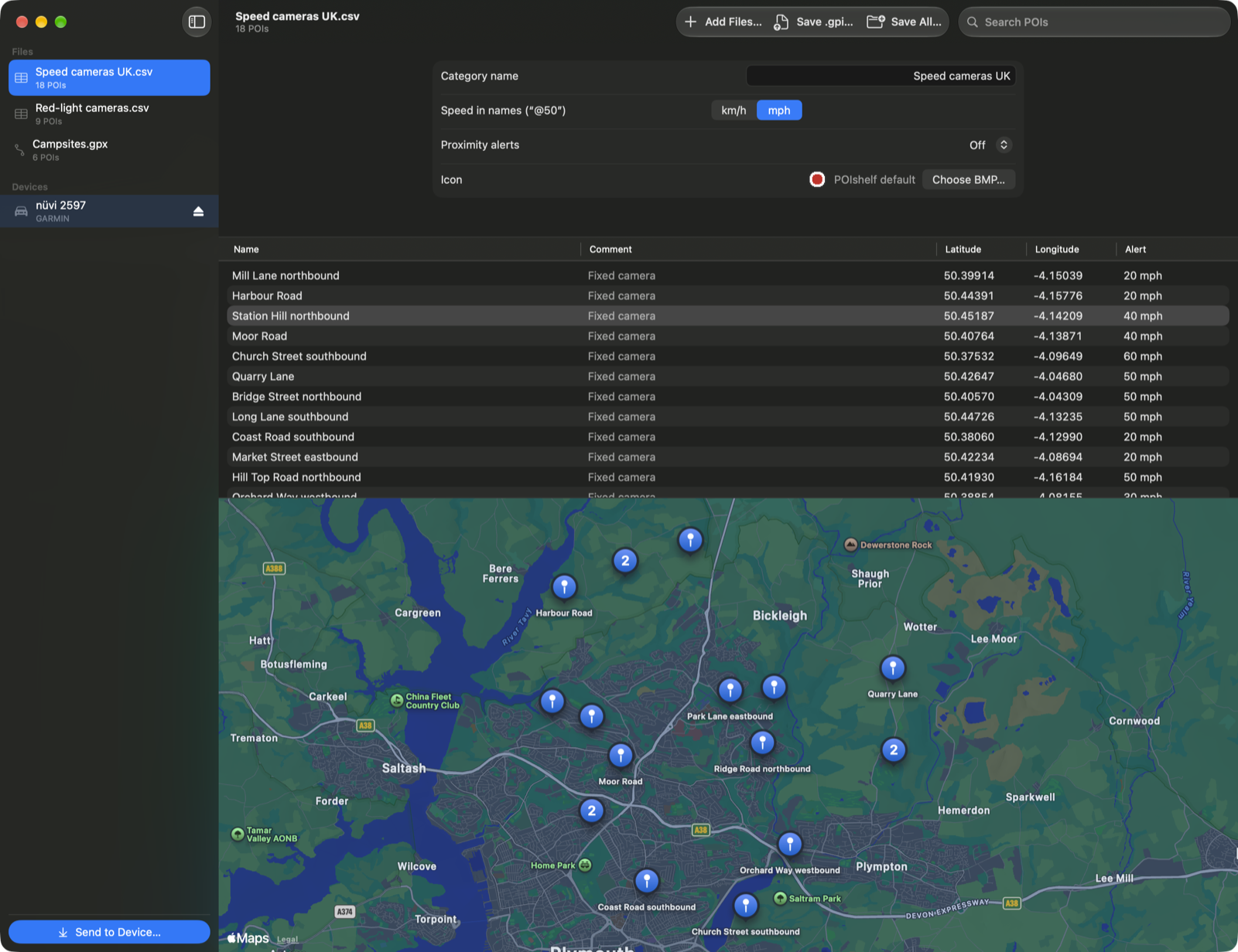
This is why we built POIshelf. It is a native Apple Silicon app that does the POI Loader job: it reads the same CSV and GPX files, turns them into a Garmin GPI file, and puts it on your device. It does not need Rosetta 2, so macOS 28 does not affect it.
What POIshelf does, and what it does not
We would rather you know exactly what you are getting:
- Imports CSV and GPX POI files, including the CSV files from POI Factory. You can drop several files, or a whole folder, at once.
- Keeps alerts. A name ending in a speed, like
Camera@30, becomes a speed alert. GPX proximity distances are kept too, or you can set one distance for a whole file. - One category per file. Each file shows up as its own category on your Garmin, with the default icon or your own 24×24 BMP.
- Sends safely. It writes one
Garmin/POI/poi.gpifile. Before writing, it backs up the existing file to your Mac; after writing, it reads the new file back to check it. - Saves .gpi files if you would rather copy them yourself.
And the limits:
- It sends directly only to devices that appear in Finder as a drive (USB mass storage) and to SD cards. Newer models that use MTP do not appear in Finder; for those you save the file and copy it yourself. See why your newer Garmin doesn't show up in Finder.
- It does not install maps. That is MapInstall's or Garmin Express's job.
- It needs macOS 14 or later on an Apple Silicon Mac.
Moving over from POI Loader
The good news is that your files do not need to change. POI Loader and POIshelf read the same kinds of files.
- Find the folder of CSV or GPX files you used to give POI Loader.
- Drop the folder into POIshelf. Each file appears in the sidebar with its number of POIs, and you can check them in the list and on the map.
- Connect your Garmin, or put its SD card in your Mac. It appears under Devices.
- Choose Send to Device…, read the summary, and confirm. When POIshelf says it is done, eject the device.
The step-by-step version, with tips for each step, is in How to load custom POIs onto a Garmin from a Mac. If you are mainly here for speed cameras, read How to add speed cameras to your Garmin from a Mac.
One thing worth knowing about poi.gpi
A Garmin keeps your custom POIs in a file called poi.gpi in the Garmin/POI folder. When you send with POIshelf, it builds one file from all the files you have added and replaces the old one. That is why it backs up the old file first. The backups are kept on your Mac, the newest ten per device, so you can always get the previous set back.
In short
POI Loader is not broken today, but on Apple Silicon Macs it lives on borrowed time. Your existing POIs are safe on the device; what goes away is the easy way to update them. If you want to keep using a Mac for this, a native app avoids the problem entirely. There is more background on our Garmin POI Loader for Mac page.